Category Archives: AI

Exposing the Missing Pieces in Our Content

Part of our campus AI journey is to design and deploy AI agents that can utilize key information from exisiting websites across campus. These agents may replace the sites, reducing technical bloat and information drift. While doing so, an unexpected benefit has emerged, one that speaks volumes about the evolving relationship between technology and content strategy on a highly decentralized campus.

When we first set out to build these agents, we did what most teams do, we pointed them at our sites or their underlying data, ingested the knowledge, tested retrieval, and began crafting conversations. But something interesting happened when we put these agents to work. People have started asking for things we couldn’t give them.

In short, the agents began surfacing questions we hadn’t anticipated; questions students, faculty, staff, and prospective Longhorns are likely asking every day. And, just as importantly, they showed us where our data and content fell short.

They have become mirrors, reflecting the structure, and the fragmentation, of our institutional knowledge. The things they cannot answer point directly to gaps in the content architecture: outdated FAQs, scattered documentation, siloed policy pages, and even buried gems of information lost in PDF archives or legacy web systems. It’s not that the information doesn’t exist. It’s that it’s too hard to find, inconsistently written, or lacks the context necessary to form a coherent response. We are sure the agent isn’t making mistakes per say, it tells us what it can’t say, and that’s been incredibly valuable.

One of the more revealing moments for me came when we began evaluating how the agent performed with the A–Z directory. This is a resource that has long served as the backbone for finding services and offices across the university. But once we put the agent to work with this data, the limitations of that system became painfully clear. What we had assumed was structured, complete, and reliable turned out to be limited, outdated, and in some cases, misleading.
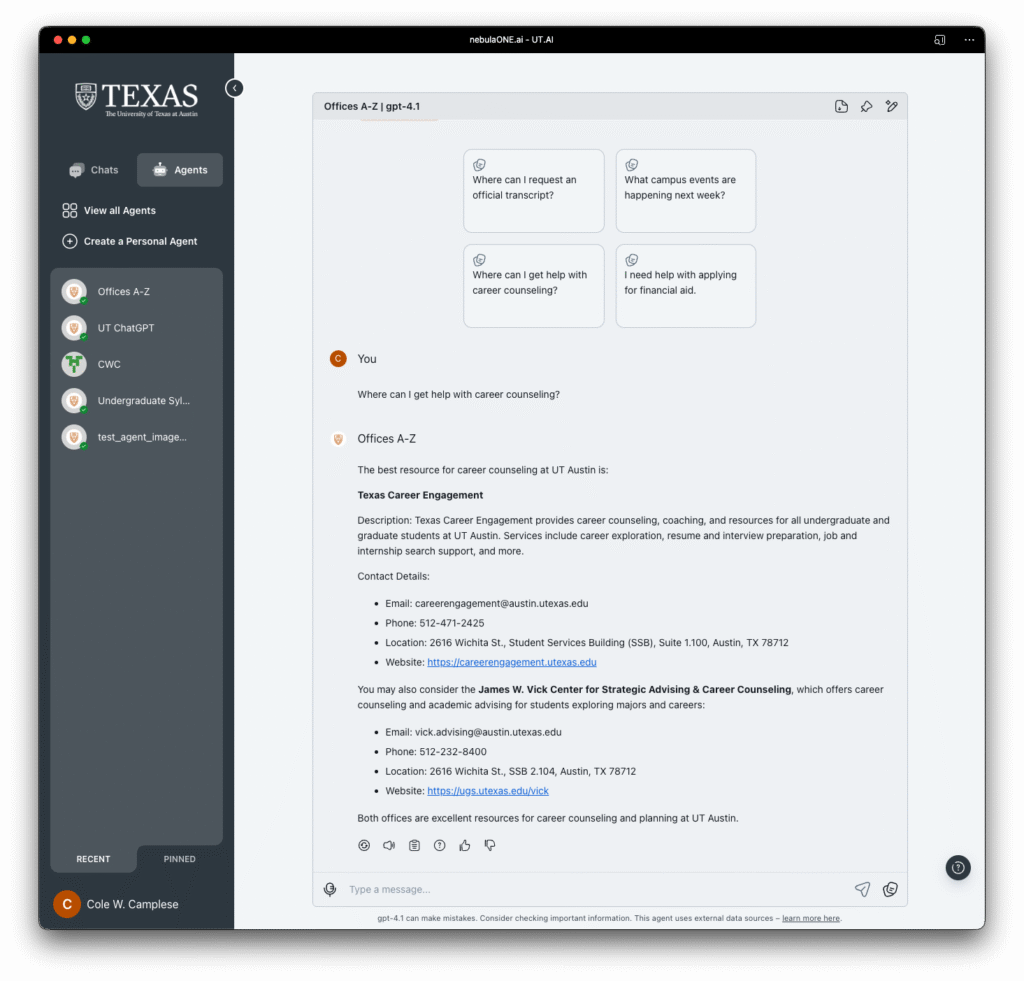
UT Spark AI interface showing the A-Z agent.

This has been a bit of a wake-up call. It is so tempting to take a “lift and shift” approach, move what we have on the web into the AI agent and assume it will just work. But that does not hold up. The agent exposes what the web often hides. It forces precision. It requires context. And it absolutely demands trust in the data that fuels it.

We are now integrating these insights into a more systematic approach. Each time a query breaks down, we want to trace it back. What we need to be asking centers on: Should this information exist? If so, where should it live? Can we make it easier to find, easier to understand, and easier for the agent to serve up confidently?

This work is not just about making our AI better. It’s about making our websites more accessible, our documentation more useful, and our services more responsive. Every gap we close improves the experience not just for the agent, but for the human trying to find their way. I didn’t expect this kind of feedback loop to emerge so quickly, but I’m glad it has. It reminds us to slow down, look closely, and be intentional, not just with how we build agents, but how we steward the information we share across this institution.
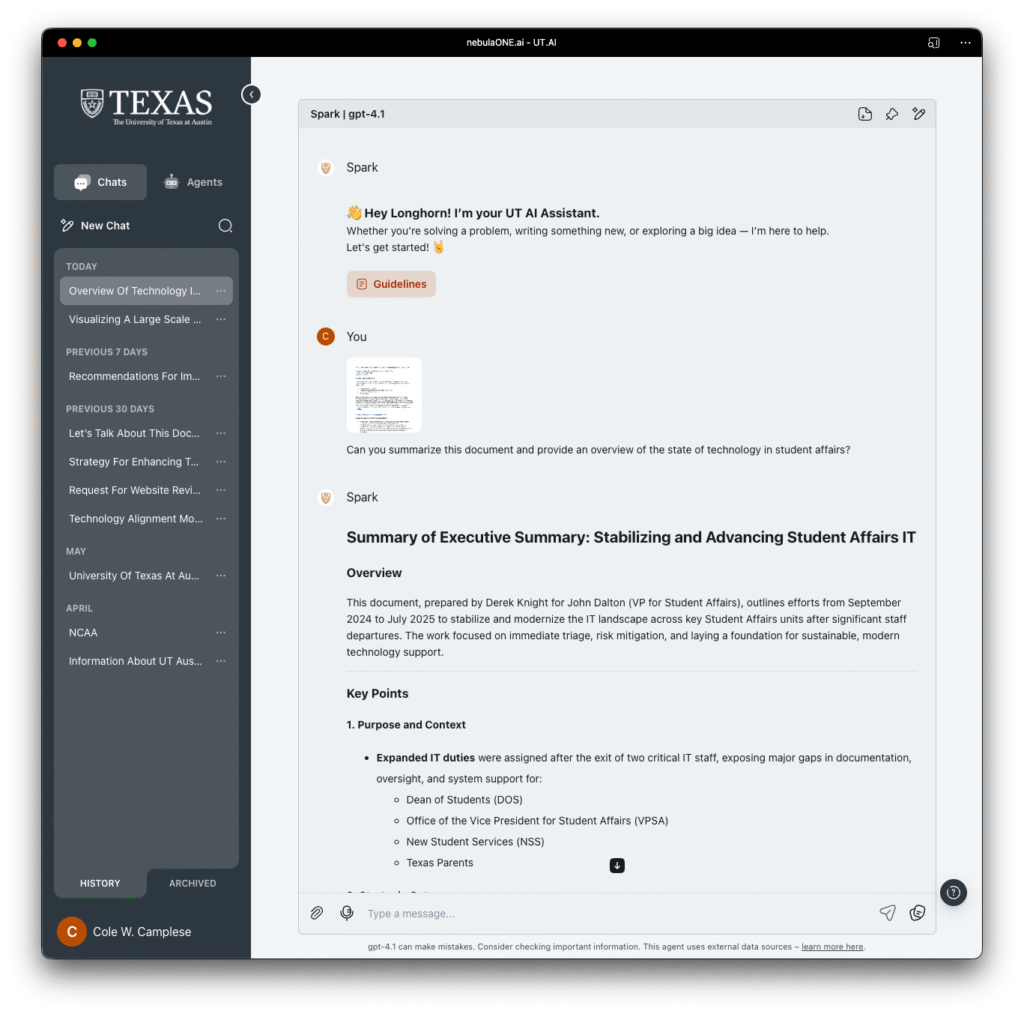

UT.AI Spark Preview

Most people aren’t aware, but there is something new getting ready to happen on campus. For our team, this is the quiet before the storm right now. Those of us working toward this have a quiet energy about us, the kind that comes with anticipation and a sense that something big is about to unfold. Over the past few months, we’ve been quietly working with teams across Enterprise Technology, ITLC members, Microsoft, and CloudForce to bring a new platform to life. It has been designed to put artificial intelligence directly into the hands of our community. We’re calling it UT.AI Spark, and while it’s still in preview, the excitement is already building as more and more people get a chance to explore what it can do.

What’s interesting about Spark isn’t just the technology (though, yes, it’s powerful and flexible and all the things you’d hope for in a modern AI platform). It’s the way we’re approaching this launch. Instead of flipping a switch and calling it done, we’re inviting people in early, listening closely, and letting the platform grow in response to real needs and real feedback. Our partners at CloudForce are right there with us, each request turning into a, “what if we could create …” conversation to see how we can make it happen. It’s a little bit messy, a little bit experimental, and very much in the spirit of how I prefer to do things: open, transparent, and always focused on what’s actually useful for students, faculty, and staff.

What we plan to release in the next month or so is a stable and robust 1.0 version of our own OpenAI deployment that all of us can use. It means there will be a roadmap articulated so the community can help us go from 1.0 to 1.1 to 1.2 and so on.

Already, early adopters are finding creative ways to use Spark, from analyzing data in new ways, to brainstorming lesson plans, to simply asking better questions, to creating custom agents to do their bidding. And as each new group comes on board, the community around Spark is starting to take shape. There’s a lot of curiosity, a healthy dose of skepticism, and a genuine desire to figure out what responsible, meaningful AI use looks like in a university setting.

UT.AI Spark interface screenshot.

As the fall semester rolls around, everyone at UT will have access. That’s when things will really get interesting. We’ll have workshops, training, and plenty of opportunities for people to share what they’re learning. But even before that, the most important work is happening now: listening, iterating, and building something that feels right for this campus.

If you’re curious, keep an eye out for updates and invitations to try Spark for yourself. And if you’re already part of the preview, thank you for helping shape what comes next. This isn’t just about rolling out another tool, it is about starting a conversation and seeing where it leads. I can’t wait to see what we create together.

Copilot Reflection: First 90 Days

Even in the middle of summer, I’m continually reminded of the energy that pulses through our campus. It’s an energy fueled by curiosity, by a relentless drive to learn, and by a community that believes deeply in the power of innovation. Over the past several months, that energy has found a new outlet through our Microsoft Copilot Initiative—a key pillar in our broader UT.AI strategy.

When we launched the Copilot Initiative, our goal was simple but ambitious: to transform the way we work, collaborate, and solve problems across UT Austin. By integrating Microsoft 365 Copilot tools into our workflows, we set out to empower our staff to reclaim time, enhance productivity, and build the digital fluency that will define the next era of higher education.

The results so far have been impressive, with more to come. More than 1,200 staff members have participated in workshops, webinars, and hands-on labs. One in three participants now reports saving 1–2 hours per day—time they’re reinvesting in creative, strategic work that moves our university forward. Over 90% of our colleagues rated these learning experiences as exceptional or above average. These numbers are impressive, but what excites me most are the stories behind them: staff using Copilot to draft emails, summarize complex documents, organize workflows, and transcribing meetings to more quickly arrive at impactful descion-making. We’re not just adopting new tools—we’re reimagining what’s possible.

Of course, transformation isn’t always easy. We’ve encountered challenges around license allocation, data governance, and the quirks of moving from Box to SharePoint. But these are exactly the kinds of problems that signal real change is underway. They push us to ask better questions, to iterate, and to build solutions together.

What stands out from our interviews and feedback is a hunger for more: more cohort-based learning, more job-specific scenarios, more opportunities to experiment and grow. This is the heart of what makes UT Austin special. We are, at our core, a community of perpetual learners.

Looking ahead, I’m excited for what’s next. Later this month, we’ll gather for our AI Summit Week to share use cases and deepen our engagement. We’re rolling out expanded webinars and train-the-trainer workshops, building the internal capacity we need for sustained, campus-wide adoption. And as we do, we’ll continue to listen, to adapt, and to celebrate the creativity and resilience of our staff.

The Copilot Initiative is just one part of our larger UT.AI vision—a vision where technology is not just a tool, but a catalyst for lifelong learning and a culture of innovation. My hope is that we keep pushing the boundaries, keep asking what’s possible, and keep learning together. Because at UT Austin, the future isn’t something we can wait for. It’s something we build, one experiment, one workshop, one bold idea at a time. Here’s to always learning.

Here is a little summary of what we are experiencing from our post training workshop feedback:

AreaKey Findings
Training Reach1,200+ staff trained across UT Austin
Time Savings33% saved 1–2 hours/day; 56% saved 1–2 hours/week; 11% saved 1–2 hours/month
Satisfaction90%+ rated sessions as exceptional or above average
ProductivityCopilot used for drafting emails, summarizing documents, organizing workflows, project planning
AdoptionHigh demand for continued learning; strong interest in cohort-based and job-specific training
ChallengesLicense allocation, data governance, platform inconsistencies (Box vs. SharePoint)
Cultural ImpactStaff appreciated transparency and the university’s commitment to digital transformation

Agent Agency

Last week was an eye-opening one on a few levels. I spent time with CIO colleagues from various schools around the Country and State at the Dell Higher Education Advisory Board meeting. The first thing I will say is that spending time with people I know and respect in our field is always a powerful opportunity to learn and measure how we are approaching our common problems of practice. The other thing I will say is that it is becoming even more clear that people outside of higher education don’t seem to fully understand what the role of a CIO or IT in general looks like in our context. It isn’t that our corporate partners don’t have a sense of what we think about, but there is a whole other side to what we do that seems to be hidden from them.

As a CIO of an R1 university, I do think about teaching and learning quite a bit, but it isn’t what the job is fully about. We spend a lot of our time working toward making every single aspect of campus life more effective, delightful, and efficient. That means, that while teaching, learning, and research are core areas of focus, we also spend a great deal of time working across various businesses to drive impact and outcomes. Universities are small cities with everything from power generation, police forces, critical systems, and everything in between to be concerned about. What we need as higher education CIOs are stories and examples of how our multi-national corporate colleagues run their lines of businesses that we can translate.

The Dell team talked a lot about the rise and potential of agentic AI. While many of the examples were focused on the educational sphere — curriculum creation, assessment, study partners, etc — things got much more interesting when a few of us pulled our colleagues aside and told them we were just as interested in how they and their clients are using them across local and state government, corporate sectors, retail, finance, construction, and others. Once they started to show us real life examples of how they are applying these types of strategies in those contexts, my mind was racing with ideas of how we could alter their corporate solutions and apply it to the higher education landscape.

Agentic AI, refers to AI systems capable of autonomous decision-making and actions, can be a game-changer in various aspects of university operations. Imagine AI-driven systems that can self-manage administrative tasks, optimize resource allocation, and even create automated decision support systems. Agents can analyze vast amounts of data to identify patterns and make informed decisions, freeing up human resources to focus on more strategic and creative endeavors.

I personally believe that one of the most promising applications of agentic AI in universities is in the realm of administrative efficiency. AI can streamline university communications, fund-raising, energy management, construction, housing and dining, and financial management. For instance, AI-driven systems can autonomously manage and optimize campus-wide energy usage, significantly reducing costs and improving sustainability. Similarly, AI can automate and enhance the efficiency of student housing allocation, ensuring that space is utilized optimally, and students’ preferences are considered. I firmly believe that once we make the move into this arena, we will be applying agentic AI in ways that can reduce the personal load associated with many of the ongoing administrative challenges we deal with every single day. In your ongoing learning with AI, what are you seeing as the primary opportunities to bring agentic AI into our own operations?

Living the Digital Transformation We Preach

As the IT leaders at UT Austin, we spend a lot of time talking about digital transformation. We encourage campus to embrace modern tools, work smarter, and take advantage of the technology investments we’ve made. But here’s the real question, are we practicing what we preach? If we want to lead the university into a more digital, connected, and efficient future, we need to start with ourselves. We need to live in the environment we’re asking others to adopt, not dismiss it, not just support it, but fully commit to it.

Right now, we’re operating in a fragmented digital world. Some teams use Slack, others use Teams. Files are scattered across OneDrive, SharePoint, Box, Wikis, and more. Some meetings are on Zoom, others on Teams. We are juggling platforms when we could be harnessing the power of our enterprise-supported ecosystem and putting Copilot to work for us.

When groups on campus reach out for help improving their digital workflows, we should be the experts they turn to. But how can we do that if we aren’t fully invested ourselves? If we don’t know Teams inside and out, how can we teach others to maximize it? If we’re not using OneDrive and SharePoint to store our work, how can we expect others to move away from Box? This isn’t just about efficiency, it’s about leadership. The best way to drive change across campus is to lean into the change. And imagine the stories we can share with the community as we do!

Here’s our challenge, we need to standardize our own workflows before we can credibly push others to do the same.

  • Teams over Slack. All our internal communications should happen on Teams—chats, channels, file sharing, and collaboration. We can’t ask campus to make the switch if we haven’t fully embraced it.
  • OneDrive & SharePoint over Box. Moving documents to a single, integrated storage platform makes collaboration easier and security more resilient. I am not talking about engineering new workflows that support campus operations, I am primarily concerned with our internal workflows.
  • Teams Meetings over Zoom. We already have a robust, enterprise-supported meeting platform in Teams. It integrates with our calendars, our files, and our workflows. Let’s stop defaulting to Zoom when Teams can do the job. I completely understand that incoming meetings are often up to the organizer, but once we can start to show value in the automation that Copilot in Teams meetings provide, we have a reason for other groups on campus to make the change.
  • Microsoft Forms over Qualtrics. I am honestly tired of responding to basic questions using our most powerful enterprise survey tool. MS Forms should be used for all lightweight data collection.
  • AI & Automation with Copilot. Microsoft Copilot is already here, and it should be changing the way we work. But we won’t understand its full impact unless we actively use it. How can AI streamline our daily tasks? What reports, emails, and meetings can we automate? The only way to know is to test, learn, and apply. The SLT has decided that we are providing M365 Copilot to the entire organization.

I want to be clear, every time we use tools outside our enterprise systems, we create more work, more risk, and more fragmentation. We make it harder to secure data, harder to collaborate, and harder to support the very systems we advocate for. If we want campus to streamline their tech stack, we have to start with our own teams. That means cutting out redundant tools and fully investing in M365, not just because we’re told to, but because it makes our work more effective.

Digital transformation isn’t just about technology, it’s a cultural shift. It’s about building habits that make work easier, faster, and more connected. But culture change starts with us. I am asking us to set the example.

I want us to create a comprehensive plan for making this the new normal within Enterprise Technology. I know who some of the people are who can help lead this, but I am actively looking for people who can help and will take some responsibility in leading this.

OpenAI generated image showing people working together in a UT themed room.

Image created by OpenAI.